Sunday, December 16, 2018

WEEK 3 SUMMARY

WEEK BEGINNING: 10th of December, 2018
WEEK ENDING: 16th of December, 2018

[DISCLAIMER: I missed some of this week for personal reasons. Sessions I missed will not be covered in depth.]

MONDAY - (absent) Sketchbook Project introduction, After Effects Workshop

Blog posts: https://ncarolannua1b.blogspot.com/2018/12/sketchbook-project-introduction.html

- I've found through the brief and other people who attended what this project entails. The blog post I have for this project is just brief notes on what I need to do; I won't be writing about what happened in the session.

- The After Effects workshop was continuing our "Guess the Movie" morphing animations.

TUESDAY - (absent) Narratology: Proppian Fairytales

<to be added>

THURSDAY - After Effects continuation

Blog post: https://ncarolannua1b.blogspot.com/2018/12/animation-principles-iteration-1.html 

- I started my movie prop morphing animation after missing the session where everyone else had started.

SUMMARY
This wasn't a great week for me, but it had nothing to do with university. I've fallen behind a bit with work from both last week and this week, and my head space isn't too good at this point. I feel like, given my circumstances, that's understandable. 

I was able to get a little bit of work done this week for my morphing animation, but I got frustrated at it very quickly. Nothing worked how I wanted it to, and the fact I was working in a program I already wasn't getting along with didn't help either. I'm going to have to give myself a little bit of time to be in the right head space to work on this animation further, because I feel like continuing at this point would just make me give up a lot faster.

The Narratology presentation isn't really speaking to me this time around. Looking at fairytales and a lot of the rules that go into making one aren't really what I'm interested in. Again, I'm not in the best headspace at the moment, so I'm probably going to give myself some time and make sure I'm 100% ready to look back and focus on the presentation I missed. 

Thursday, December 13, 2018

ANIMATION PRINCIPLES - ITERATION 1

This post, I'm putting up my first iteration of my Infinity War Morphing animation.


This is the result of 3 hours of asset creation and animating in After Effects.

I started off this iteration by creating all the individual components in Adobe Illustrator. Both Illustrator and After Effects are vector based, meaning that you can keep zooming into the lineart and not sacrifice quality. It's the opposite of programs like Photoshop and Premiere Pro, which are pixel based.

Since this is a first iteration, it's still very basic. I have the fist closing, a little bit of bounce when all the fingers are fully enclosed, and the Time Stone moving to where it should be when the Eye of Agamotto formed.

There's some slight movement from things that I probably won't want moving in the final animation; the forefinger and hand plate details move when they shouldn't. That's definitely something to fix for the next iteration.

I'm going off the very rough idea that I came up with during the initial brief of this task, as seen in this blog post.


So where to go next? Well, it's mainly getting the Infinity Gauntlet to turn into the Eye of Agamotto. I have to have the fingers, hand plate and cuff all to turn into separate elements of the Eye of Agamotto, minus the Doctor Strange emblem from the original plan. Hopefully, the Illustrator files and layers will be compatible to make morph.

Monday, December 10, 2018

SKETCHBOOK PROJECT - INTRODUCTION

[DISCLAIMER: Due to personal reasons, I was absent from this session. This blog post will simply outline what this project involves.]

This sketchbook project will be running up until our hand in with our Narratology essay and Morphing animation. 

We've all been given a blank A4 sketchbook, and told to just draw in it. It can be observational, random drawings of whatever we want, daily comics, storyboards, etc.

Looking at the brief, the comics idea seems most appealing to me. Much of my drawing history has been in drawing comics, so returning to the medium after not drawing comics since 2015 would be a good way to get my creative comic side out again!

This is also a good excuse to draw from life too. I've really been enjoying life drawing recently, and I kind of been wanting to do some more in my own time (of clothed people in this instance). So being able to do observational drawings / drawing from life could be a good way to get that out my system!

ANIMATION PRINCIPLES - EYE OF AGAMOTTO DOCUMENTATION

One of my two chosen props for the Morphing animation is the Eye of Agamotto from the Marvel Cinematic Universe. This post is a documentation of what it is, it's various appearances and how I plan to use it in the animation.

THE EYE OF AGAMOTTO

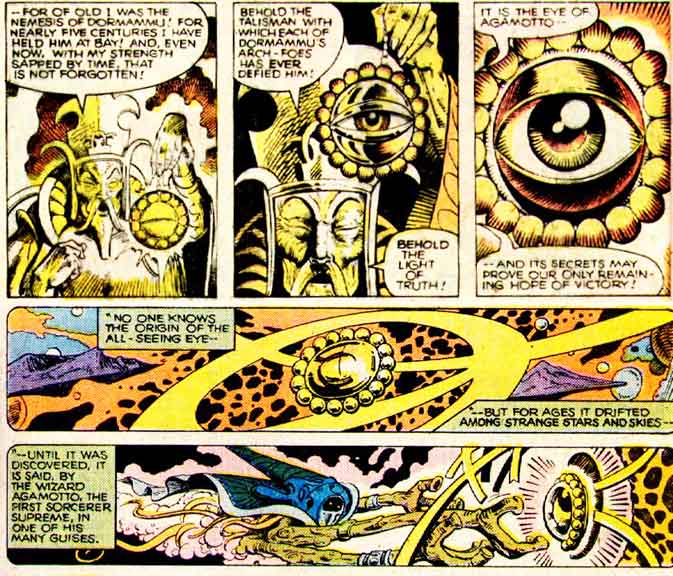
The Eye of Agamotto first appeared in Strange Tales #115, in the possession of Doctor Strange.

Image result for eye of agamotto first appearance
(The Eye of Agamotto, explained in the early comics it appeared in - credit: Marvel Comics)

The Eye's powers revolve around the supernatural and magical side of the Marvel Universe, including being able to see through illusions & disguises, look through time, and locate beings by psychic means. It can create portals and suspend objects too, but it's most recognisable purpose is just as the clasp for Strange's Cloak of Levitation.

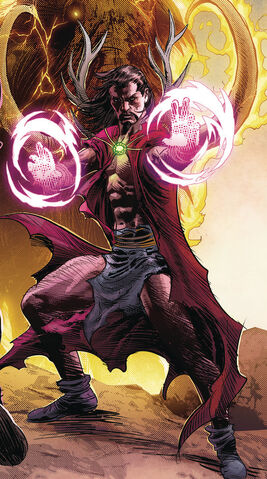
In 2017, Marvel introduced the human embodiment of Agamotto from 1,000,000 BC. He was part of the Stone Age Avengers, and was the Earth's first Sorcerer Supreme. He wears a pendant similar to the one Strange wears named after Agamotto.


File:Agamotto (Earth-616) from Marvel Legacy Vol 1 1 Deodato Wraparound Variant Textless.jpg
(Agamotto from a variant cover of Marvel: Legacy #1 - credit: Marvel Comics)

In 2016, the Eye of Agamotto was introduced into the Marvel Cinematic Universe in Doctor Strange, directed by Scott Derrickson. In this continuity, the Eye itself was just a case for one of the six Infinity Stones spread throughout the MCU; this one being the Time Stone. Using the Eye of Agamotto allows the user to control time itself; make it start & stop, slow down, speed up, and create time loops on repeat infinitely.


(Doctor Strange using the Eye of Agamotto to create an infinite time loop; every time he dies, he restarts from the beginning of the loop - credit: Marvel Studios)

The Eye later reappeared in Thor: Ragnarok (albeit without being used) and Avengers: Infinity War, in which the Eye casing was destroyed and the Time Stone was stolen from it; both actions comitted by Thanos.


The Eye of Agamotto has only had two designs throughout media; the comic design and the movie design.

In the comics, the Eye is comprised of a disc, two hollow quarter spheres, multiple small beads around the edge of the disc and the eye inside. It's completely gold, and the actual eye changes colour.

Related image
(The comic look of the Eye of Agamotto - credit: Marvel Comics)

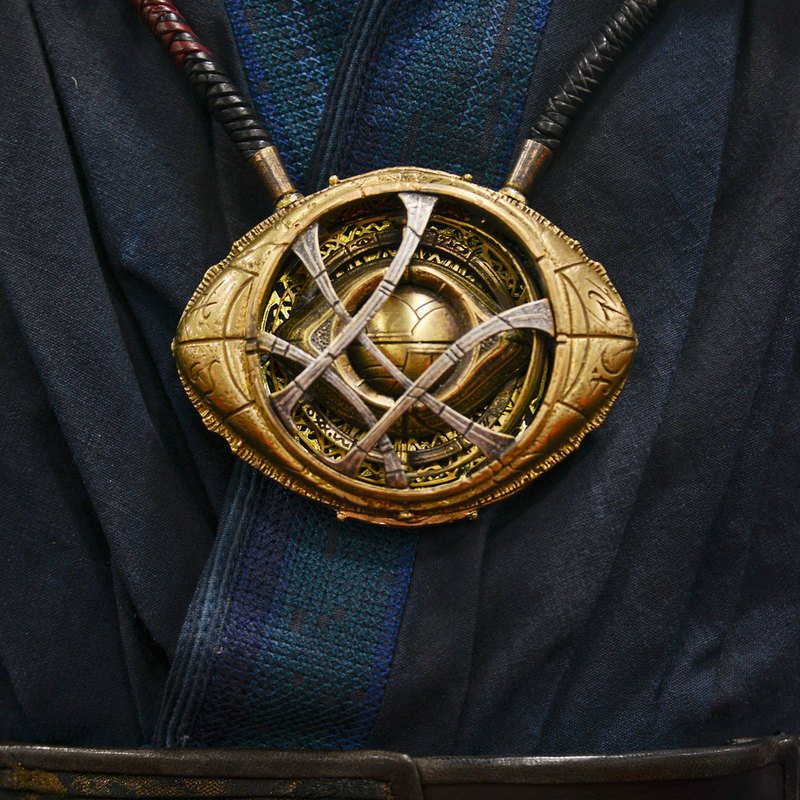
In the movies, it's squashed down from a circle to more of an oval, with spiked edges where two semi-circles meet. There's more depth to the casing, including a hollowed out circle holding the Time Stone, two quarter spheres covering the stone (similar to the comic design), and a cross hatch design overlaying the Stone resembling the Doctor Strange emblem. Instead of acting as a clasp for the Strange's Cloak, this Eye of Agamotto more resembles a necklace, with two prongs sticking out at the top. The Eye uses different shades of gold, bronze and silver for the casing, and the Time Stone inside is green.

Image result for eye of agamotto
(The Eye of Agamotto from 2016's Doctor Strange - credit: Marvel Studios)

For the animation, much like the Infinity Gauntlet (see this post), I'm going to use the MCU design. The two would fit together much better than if one design was from the comics and one from the movies. The two mediums, while trying to convey the same idea of the prop, have different visual languages that aren't too compatible next to each other.

Sunday, December 9, 2018

WEEK 2 SUMMARY

WEEK BEGINNING: 3rd of December, 2018
WEEK ENDING: 9th of December, 2018

[DISCLAIMER: I missed some of this week for personal reasons. Sessions I missed will not be covered in depth.]


MONDAY - Introduction to "Guess the Movie" task

Original blog post: https://ncarolannua1b.blogspot.com/2018/12/animation-principles-introduction.html

- This was just our introduction to our "Guess the Movie" project, that's running for 4 weeks and involves taking two props from a live action movie and making them morph into each other.

- "So this project seems REALLY exciting! I love working with media I love; it's the kind of stuff I was doing before starting this course. When both your subject matter and your medium involves something you're passionate about, then you become a lot more invested in it, which is exactly what I'm going for! From here, I think asset creation is what I'm going to aim for next. The drawing tools in After Effects, the program we're making this animation in, aren't really my cup of tea. However, I'm a lot more comfortable in another vector based program, Illustrator. I could make the assets there and import them over somehow? Will have to look into that."

TUESDAY - Narratology: "Only Trouble is Interesting?"

Original blog post: https://ncarolannua1b.blogspot.com/2018/12/narrative-only-trouble-is-interesting.html 

- We discussed if stories had to have some kind of conflict, and looked at the ideals of Western storytelling standards vs Eastern ones.

- "This session was generally very interesting! Before this, I thought I had a pretty good understanding of plot structure, but I learnt a lot more that I wouldn't have known had I not attended! The most interesting thing was definitely Kishotenketsu; it's a fairly unconventional plot structure for western societies, and one I didn't know about beforehand. I really want to keep the structure in the back of my mind, so that when the time comes to make my own story, I can consider this less seen method!"

THURSDAY - (absent) After Effects session

From what I've gathered, this session was just getting a start with the "Guess the Movie" task.

SUMMARY
Getting the brief on our After Effects project was a lot more exciting than I thought it would be! I love working on projects that involve the things we love, and being a huge fan of superhero movies, I was up for working on anything that meant I could incorporate my favourite movie in it! Although it does come with the angle of it having to be done in After Effects... my experience thus far with the program has NOT been good. But I guess it's something I'm just going to have to get used to, especially if I want to be able to do the things I want to with this task.

Narratology this session was really interesting; a lot more so than I usually expect from these types of lectures. I knew beforehand there were certain formulas and tropes that stories fall into, but I never knew there were certain ones that are almost always present dependent on your location. Kishotenketsu was really interesting to look into as well! We also got the 5 question templates for our essays; I think I'm going to look at the one regarding how animation is intrinsic to the narrative. It seems really interesting, and right up my alley! It also means my ideal film of Who Framed Roger Rabbit? fits a lot more.

ANIMATION PRINCIPLES - INFINITY GAUNTLET DOCUMENTATION

This blog post is just a rundown of the one of the two props I've chosen for my morphing animation; what they are, a brief history, and how I intend to use their characteristics in the animation.


THE INFINITY GAUNTLET

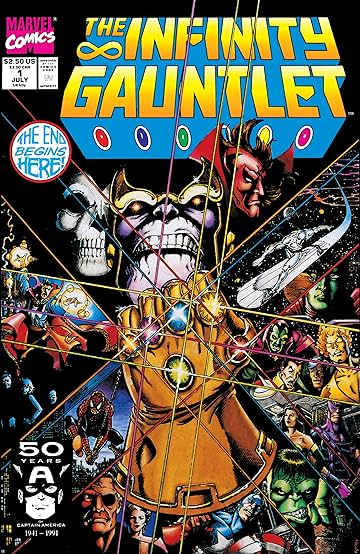
The Infinity Gauntlet first appeared in Marvel Comics in 1990, in Silver Surfer #44. It later became the main story element of 1991's mini-series The Infinity Gauntlet.


Image result for the infinity gauntlet #1
(The cover of The Infinity Gauntlet #1 - credit: Marvel Comics)

The Gauntlet was made to house the six Infinity Gems, each one controlling an aspect of the universe; Time, Space, Reality, Power, Mind and Soul. When you claim one of the gems, it grants the user the ability to manipulate whatever the gem represents; for example, using the Power Gem can be used to enhance the user's physical strength.

When Thanos assembled them all in the Infinity Gauntlet, he became more powerful than a god, and fought Earth's combined forces after eliminating half of all life to impress Lady Death, an personification of death itself.


Image result for thanos snap comic
(The iconic finger snap from Avengers: Infinity War was inspired by these panels from the first issue of The Infinity Gauntlet - credit: Marvel Comics, art by George Perez)

The Infinity Gauntlet storyline was then adapted into Marvel Studio's Avengers: Infinity War and the upcoming Avengers: Endgame. The former of the two borrowed heavily from the first 4 issues of the original comic run, including Thanos using the Gauntlet to remove half of all sentient life, a herald falling into Doctor Strange's Sanctum to warn Earth of Thanos, and an outer space assault on Thanos.


(Thanos at the end of Avengers: Infinity War - credit: Marvel Studios)

The Gauntlet has made appearances in other media, including the Avengers Assemble Marvel Super Hero Squad Show animated series', as well as the Contest of Champions mobile game.


(Thanos with the Infinity Gauntlet in Marvel Super Hero Squad Show - credit: Marvel Animation)

Over the course of the Gauntlet's near-30 year history, it's had various different designs. It's first design, heavily utilised in the 90s, makes the Gauntlet seem like a flexible, one-piece glove with some metal elements looping around the fingers and following down to the housing for the stones on the back of the hand.

Image result for darkseid infinity gauntlet
(DC Villain Darkseid with the Infinity Gauntlet in a crossover event, showing the more flexible, almost rubber glove like behaviours of the Gauntlet - credit: Marvel Comics and DC Comics)

The modern comic design takes more cues from both the MCU's tease appearances, with more mechanical aspects and making the Gauntlet seem like real metal.


Image result for tony stark infinity gauntlet
(Tony Stark with the Infinity Gauntlet, during a 2011 Avengers issue - credit: Marvel Comics)

The Marvel Cinematic Universe took the approach of having it be designed, in-universe, by Eitri the Dwarf, who also created Thor's weapons. The design has the same visual language as the Asgardian weapons he'd designed in the past, specifically with the design of the cuff using weaves and feather patterns.

Related image
(Thanos with the MCU's Infinity Gauntlet in Avengers: Infinity War - credit: Marvel Studios)

The MCU design is what I'm going to use for the morphing animation, simply because the animation has to feature the film's props, not the comic's.

Thursday, December 6, 2018

ANIMATION PRINCIPLES - MOODBOARD AND RESOURCE GATHERING

Before doing any actual animation, I decided to make a Powerpoint to document the things I needed prepped. This included:
  • A Moodboard
  • Colour schemes
  • Colour tests
  • Sketches
I started with the moodboard, which included the Infinity Gauntlet and the various Infinity Stones in different scenarios from different movie appearances across the series.

(Every appearance of the Infinity Stones in the MCU, pre-Infinity War - credit: Marvel Studios)

Even though I was settling with the Eye of Agamotto, I thought I'd include all of them. In the films, all six Infinity Stones were revealed over the course of 7 years. In order, they are:

  • Space Stone - 2011 (Captain America: The First Avenger, The Avengers, Thor: Ragnarok, Avengers: Infinity War - encased in the Tesseract, kept in Odin's Vault)
  • Mind Stone - 2012 (The Avengers, Captain America: The Winter Soldier, Avengers: Age of Ultron, Captain America: Civil War, Avengers: Infinity War - encased in Loki's Sceptre, moved to Vision's forehead)
  • Reality Stone - 2013 (Thor: The Dark World, Avengers: Infinity War - encased in the Aether, with The Collector on Knowhere)
  • Power Stone - 2014 (Guardians of the Galaxy, Avengers: Infinity War - encased in the Orb, with the Nova Corps. on Xandar)
  • Time Stone - 2016 (Doctor Strange, Avengers: Infinity War - encased in the Eye of Agamotto, with Doctor Strange at the Sanctum Sanctorum)
  • Soul Stone - 2018 (Avengers: Infinity War - kept on Vormir, guarded by Red Skull)
The Eye of Agamotto was definitely the best choice between all six stones, due to a combination of the casing itself and how interesting it looks. As it stood before Infinity War, the only other encased stones were the Reality, Space and Power stones. But their casings were basic 3D shapes, with nothing interesting to look at with them. The other two stones, Mind and Soul, were stored in a character's head and a planet respectively, which I couldn't really do. Thus, the Time Stone, and the Eye of Agamotto casing, won out.

When deciding on potential colour schemes to use, we used the Adobe Colour website to experiment and test different combinations. The website lets users use a wheel to create their own colour palette.

I made two main colour schemes while testing what would look good; one which focused more on colour reusage based around the stones themselves, and one that focused more on the Gauntlet itself. In the end, I put opted for colour scheme 2, after seeing it work better in a Photoshop trial of the original Infinity Gauntlet comic cover. 

The final thing I decided to document was the assets I needed to create. After trying out the tools to create shapes in After Effects, I elected that it wasn't quite right for me. I think that making them in a separate Adobe program, like Illustrator or Photoshop, would be best. For each prop, I split them into their core pieces. For the Infinity Gauntlet, they were:

  • Fingers - The fingers of the gauntlet
  • Hand plate - The plate of the Gauntlet that houses the stones
  • Thumb - Similar in function to the fingers, but somewhat different in shape
  • Cuff - Where you put your arm into

And for the Eye of Agamotto, they were:

  • Time Stone - A green oval
  • Main casing - The base of the entire Eye
  • Doctor Strange emblem - A cross hatch design associated with the Doctor Strange character

All my visual documentation can be seen in the Powerpoint below.

Tuesday, December 4, 2018

NARRATIVE - ONLY TROUBLE IS INTERESTING?

This session focused on the idea of conflict in narratives, and if they're necessary or not. 

First, we went over the pre-set essay questions we can choose from. They are as follows:

  • Analyse your chosen narrative with close reference to the Hero's Journey, or another appropriate story template
  • Make a proppean analysis of an animated fairytale, and explain animation's particular suitability for telling fantastical tales
  • Stories have been described as an engine for social change. Analyse your narrative with reference to it's social or moral purpose, and the techniques used to convey this.
  • "Only available to animation". To what extent does this Paul Wells quote apply to your chosen film? Explain how the medium and materials enter, shape and define the narrative.
  • Animation is a uniquely visual medium. Analyse your chosen narrative as a successful example of visual storytelling.

I'll return to the questions at the end of the post. For now, let's focus on the main focus of the lecture: conflict vs non-conflict plots.

Conflicts in stories tend to arise from the characters, and usually specifically suit that character. The Iceberg Theory, relating to the depth of the character being found from what you can't see (like the ice underneath the water), also helps in finding the right foil for the character.


"Find a character like yourself, who will want something or not want something with all his heart" ~ Ray Bradbury

The size of the want doesn't matter, but the difficulty of achieving it is. And that's where conflict is important.

"We enjoy seeing fictional characters suffer... these basic stories... acknowledge our basic anxieties" ~ Scarlett Thomas

Plots use pathos (influencing the audience's emotions) to carry wider meanings and messages.

CONFLICT

Conflict is important to stories to bring in some interesting elements to them. No-one would want to watch a film about somebody who just goes about their life with nothing interesting or extraordinary happening. Introduce someone who challenged them to a fight one day, then you have a more engaging and interesting story.

"Stories happen because someone wants something and has trouble getting it" ~ David Mamet

We were shown a short film by Canadian filmmaker Norman McLaren, which uses pixilation animation to show the conflict of two neighbours over a flower that each claims grew in their own garden.


(Neighbours by Norman McLaren)
Generally, there are two types of story:
  • A man goes on a journey

    or
  • A stranger comes to town
And within those, there are four mythoi (genres, essentially)
  • Comedy
  • Romance
  • Tragedy
  • Satire
(Kurt Vonnegut Jr, an American writer, demonstrating story archetypes to an audience using line graphs)

Within stories, there are also acts and sequences. Most stories follow a 3-act structure;

  • Act 1 lasts about 25% of the story, and encapsulates the exposition and inciting incident. Typical films have this act last 20 to 30 minutes, and end once the protagonist sets off on their journey.
  • Act 2 lasts about 50% of the film, showing various trials and tribulations that the protagonist goes through. We typically learn about the other characters as well, and learn more details about the plot too.
  • Act 3 is the final 25% of the film, and starts just before the climax. This act is what everything's lead up to, and shows a final conflict of some kind, and a resolution.

But all these factors are for western story structures. There's another type of narrative, the eastern variation.

NON-CONFLICT

Eastern narratives tend to follow a different guideline to western ones; where western focuses on some kind of conflict and the characters having an ultimately self-driven goal, eastern stories don't have those. They eliminate worldly desires, and tend to focus on some kind of moral or just representing the everyday.

This doesn't mean conflict can't be a part of the story; it just means that it isn't there by default. The stories can be simple, like man vs nature, or complex with man vs man. The ending is typically an emphasis of the final theme.

A key term in eastern narratives is kishotenketsu. Kishotenketsu is a four part structure typical of Japanese storytelling. The four parts are:

  1. KI - The introduction
  2. SHO - Elaboration
  3. TEN - The twist (mostly represented by an unexpected change)
  4. KETSU - Emphasis

In this structure, the twist (ten) doesn't necessarily have it be related to the rest of the story.

It's important to note that these terms aren't necessarily interchangable with western story elements. For example, Sho's elaboration is NOT the same as disruption.

An example of a story that follows the Kishotenketsu structure is The Licked Hand.

KI - A young girl is home alone with her dog
SHO - An escaped convict is reported on the news, and girl won't fall asleep unless the dog, under her bed, licks her hand.
TEN - In the night, she goes to the bathroom to find her dog dead in the bath; it was dead the entire time!
KETSU - "HUMANS CAN LICK TOO" is written in blood on the wall

This session was generally very interesting! Before this, I thought I had a pretty good understanding of plot structure, but I learnt a lot more that I wouldn't have known had I not attended! The most interesting thing was definitely Kishotenketsu; it's a fairly unconventional plot structure for western societies, and one I didn't know about beforehand. I really want to keep the structure in the back of my mind, so that when the time comes to make my own story, I can consider this less seen method!

Monday, December 3, 2018

ANIMATION PRINCIPLES - MOVIE TASK INTRODUCTION

This session, we started out the main project for the After Effects unit: a looping animation, taking two props from a live action movie and having them morph into each other on a continuous loop!

First, we were all tasked to choose our favourite live action movie. I decided to go with Avengers: Infinity War, directed by Joe and Anthony Russo.


(Avengers: Infinity War trailer - credit: Marvel Studios)

Once we had a film, we had to choose two props from it. The aim, as stated before, was to make the two repeatedly morph into each other.

Infinity War had a lot of props to choose from, so I wasn't really short of choices. The most obvious one I had to do was the Infinity Gauntlet. In the film, the Infinity Gauntlet is a glove that has 6 slots to fit 6 Infinity Stones. It's coloured gold & bronze, with the only other colours coming from the stones themselves.


Related image
(The Infinity Gauntlet prop, as shown at Disney's D23 Expo - credit: D23)

The Gauntlet is the most important prop from the whole film, so it was an easy decision to include it. The other prop, however, was a difficult decision. 

The film includes many other props aside from the Gauntlet, including the casing for 4 of the Infinity Stones, Iron Man's helment, and Thor's weapon Stormbreaker. I came up with an idea for the animation which would involve an Infinity Stone remaining unchanged, with it moving between it's casing and it's place on the Gauntlet. This left me with four choices, between the four Infinity Stones. In the end, I opted for the Eye of Agamotto, which houses the Time Stone.


Related image
(The Time Stone encased in the Eye of Agamotto, from it's first appearance in 2016's Doctor Strange - credit: Marvel Studios)

I made some sketches as to how things could look, since the props needed to abstracted enough to look recognisable, but at the same time not include every single detail on them. I also had to accomodate a limited colour palette, since we were only allowed up to 5 colours.


So this project seems REALLY exciting! I love working with media I love; it's the kind of stuff I was doing before starting this course. When both your subject matter and your medium involves something you're passionate about, then you become a lot more invested in it, which is exactly what I'm going for!

From here, I think asset creation is what I'm going to aim for next. The drawing tools in After Effects, the program we're making this animation in, aren't really my cup of tea. However, I'm a lot more comfortable in another vector based program, Illustrator. I could make the assets there and import them over somehow? Will have to look into that.

Sunday, December 2, 2018

WEEK 1 SUMMARY

WEEK BEGINNING: 26th of November, 2018
WEEK ENDING: 2nd of December, 2018

MONDAY: Introduction to Unit BA1b, Introduction to After Effects

Original blog posts:

Intro to BA1b https://ncarolannua1b.blogspot.com/2018/11/unit-ba1b-introduction.html

- A general introduction to what we'd be doing over the next few months, involving a practice task involving morphing.

- "Overall, I was happy with this session! But what I'm most looking forward to is the rest of the unit. Especially learning how to do 3D animation in Maya; I've never done CGI animation before, so it'll be interesting learning if it'll be easy, difficult, or maybe even something I'd want to keep doing throughout all 3 years! The Mystery Box project seems interesting as well; I'd seen previous examples of it, and it looks like a lot of fun to come up with the ideas and execute them!"

After Effects https://ncarolannua1b.blogspot.com/2018/11/animation-principles-after-effects.html

- An introduction to our Motion Graphics and After Effects Morphing projects. Taught us the basics of After Effects.

- "Overall thoughts? Honestly, I didn't really like this session. Motion graphics usually don't interest me, but I thought I'd give it a fair shot with this introductory session like I had done for things I previously didn't like in the last unit. But ultimately... I don't think it's for me. The combination of the subject matter itself and After Effects wasn't my cup of tea, and I can't see myself utilising motion graphics outside my university work."

TUESDAY: Introduction to Narratology

Original blog post: https://ncarolannua1b.blogspot.com/2018/11/narrative-introduction.html

- An introduction to our new essay project, looking at Narratology.

- "[...]But I did enjoy this lecture! Granted, the subject matter for this essay isn't as personally interesting as the last one was (the subject was characters). But I just need to make sure I choose something I'll be happy writing about and then it should all be alright from there! I'm struggling to come up with a comprehensive pool of films I could choose from for this, the one I'm gravitating towards most is Who Framed Roger Rabbit?. I'm going to have to double check if I'd be able to use that film though, since it's only partially animated. But overall, enthusiastic about this project!"

THURSDAY: After Effects Development

Original blog post: https://ncarolannua1b.blogspot.com/2018/11/animation-principles-after-effects_29.html

- Further development on After Effects skills

- "Overall, this session was a lot like the last After Effects one; I didn't really enjoy it too much, nothing really appealed to me personally. After Effects still doesn't feel like "my thing", especially after giving it a fair go both at uni and when finishing work at home. While the animation came out alright, it just about meets my own personal standard. The thing I feel holding me back from making it better is just my incompatibility with After Effects. I should try and find ways to make things easier to work with next week."

SUMMARY
Overall, this was a solid week in terms of introductions to the new projects. 

The entirety of BA1b looks interesting, in terms of the range of things we do and the time we get to do it. It seems as if it'll be more fast paced than BA1a was, where it was 1 project for about 2 months; now it's a few weeks per project. CGI and the Mystery Box are what interest me the most; aspiring to do CGI at an early age was what got me into animation, but I've not done it before up to this point. And seeing previous year's Mystery Box animations look really cool, creating a character of your own and bringing them to life! That's right up my alley!

After Effects on the other hand... is not. I've said it in my previous blog posts about the program, but I don't really get along with it. I gave it a fair chance to sway me, but I think it's gone under the listing of "programs I don't like". I'll use it if necessary, like for this project and such, but I can't see myself using it outside of university usage any time soon.

Finally, the Narratology project. Like I said, the topic we're looking at doesn't appeal to me as much as the Character project did, I can still spin it to become a lot more engaging to me personally! One of my main goals with this research project is to use a film I don't know inside and out; that means no LEGO Movie (even though I did that one last unit) and none of the Toy Story trilogy. This still leaves me with a lot of films I really enjoy that I could write about; as stated before, Who Framed Roger Rabbit? has been on my mind a lot; that could be a good choice.

Thursday, November 29, 2018

ANIMATION PRINCIPLES - AFTER EFFECTS DEVELOPMENT

This session, we developed on our After Effects skills, and did an exercise more heavily focused on morphing.

Our brief was given at the start of the session; take a square and a circle. Make one morph into the other, and back again. We were advised to consider both the 12 Animation Principles & where they can be applied, and to come up with unique ideas for each transformation.

I came up with my two ideas; I had the square squash in it's sides to their extremes, making the shape more resemble an "X". Once it reached a breaking point, it would snap into four individual spiked components. They'd then reform into the circle. Once the circle was reformed, I'd have a simple squash down and reemerge as the square again.

I managed to get the square to morph into the X shape easily enough; just change some attributes using bezier handles. But it was splitting the shape up that was the problem. I thought that you could just select the bit you wanted to separate, press a hotkey and then it's done. But unfortunately, that wouldn't work. There was a workaround however; separate layers.

I created the four fragments on separate layers, and made an appropriate switch out when needed. Once the X seemed like it had reached breaking point, I brought the fragments in from offscreen and animated them as they needed to move. I used the same swapping technique when bringing in the circle; once it was onscreen, the fragments shrank into the circle, blending in with the colours, and then moving offscreen.


(The animation's first pass after finishing the session. I went back later to finish it.)

Moving back into the square was somewhat trickier. The technique I had used in the last session to turn on shape into another wasn't working; this was pretty frustrating, considering that action was the base for everything else I was going to apply to the squash and stretch back up. But I realised I could just use the same thing I did for the segments yet again. I learned later on that the elements of the animation didn't actually have to morph, but look like they did.

I eventually finished, with this as the final pass;

(The final pass of the animation.)

Overall, this session was a lot like the last After Effects one; I didn't really enjoy it too much, nothing really appealed to me personally. After Effects still doesn't feel like "my thing", especially after giving it a fair go both at uni and when finishing work at home. While the animation came out alright, it just about meets my own personal standard. The thing I feel holding me back from making it better is just my incompatibility with After Effects. I should try and find ways to make things easier to work with next week.

Tuesday, November 27, 2018

NARRATIVE - INTRODUCTION

This session, we started looking at our new research project about narrative

In total, there'll be six sessions, teaching us about

  • (Un)Conventional stories and storytelling methods
  • Narrative theory
  • The unique language of animation
  • How to tell our own stories
  • Identifying when / where stories work or go wrong
In addition, we also found out there would be 5 preset questions to choose from, instead of coming up with one for ourselves. We didn't get to that yet, but next session we should do.

This time, the essay is 1,500 words, exploring the role and development of narrative within animation. We have to choose an animated film, since the narrative needs to be clear and self contained, eliminating the previous options of TV series and video game basis'. Relevant contexts should be researched, including any origins of the story. It's also important to talk about the type of animation the film uses. In most cases, it'll either be 2D, CGI or Stop Motion.

So the bulk of this lecture was centered around one topic:
What is a story?

"The idea of a 'story' may be understood as a sequence of events taking place over a particular period of time" ~ Wells, 1998

A story is just what happened in what order, essentially. There's also the term narrative, which is just a completed story. One thing that's also important to note is that plot and story, often interchangably used, are in fact NOT the same thing. 

"Plot is distinct from story. Both include the same events, but in the plot the events are arranged" ~ Tomashevsky

Plots will usually rearrange the events in the most dramatic way; it makes sure the audience sees cause & effect, it withholds and reveals information. Where story is the what happened, plot is why it happened. Usually, plots have some kind of moral or message at the end. Philosopher Aristotle is stated to have said plots work for evoking pity and fear into the audience.

Seeing characters achieve or fail teaches us, the audience, how to achieve or avoid the same fate they did. The size of the feat doesn't necessarily matter, just so long as (plot depending) the outcome is obvious.

Plots also need turning points, also known as peripetia. For conventional stories, they're crucial to bring in something new and unexpected to keep engagement up and introduce conflict if necessary.

In all, plots should follow four main guidlines:

  • They should be connected; don't introduce elements that don't go anywhere! Everything has to tie up at the end or end up somewhere.
  • They should complete at the end. Traditional plots / narratives need to leave no loose ends, so that the audience doesn't feel cheated out of a potential resolution.
  • Self-contained, unless the narrative is intended to have a second part.
  • A moment of change, completing a character's hero's journey and leaving them in a different place at the end than at the beginning.


Another key term is structure. The structure is essentially the skeleton of the overall narrative, how it's put together. In Pixar's 22 Rules of Storytelling, their 4th rule talks about structure.


"Once upon a time, there was _____. Every day, _____. One day, _____. Because of that, _____. Because of that, _____. Until finally, _____." ~ Pixar's 22 Rules of Storytelling, Rule 4

Most conventional structures are emotionally satisfying, wrap up with no loose ends, safely thrill and arrange events in the most dramatic order. 

Gustav Freytag, a German novelist and playwright, introduced the idea of a 5 act structure that narratives follow, called Freytag's Pyramid.


(Freytag's Pyramid, and it's 5 labelled points)

There are 5 parts to the pyramid, representing the 5 parts of the narrative Freytag outlined.

  1. EXPOSITION - Where the audience learns who the narrative is about. Who's the main character? What do they do? Why do we care about them?
  2. RISING ACTION - What sets the main character on their journey? Is it a person, an item, a journey?
  3. CLIMAX - The fully risen tensions. This is where the audience should have the most adrenaline regarding the story. Later story structures have moved the climax closer to the end.
  4. FALLING ACTIONS - A path set in motion after the main climax, usually the direct effect of it. Can be positive actions or negative, depending on climax's outcome.
  5. DENOUEMENT - The final resolution. Loose ends tied up, nothing left unanswered.

A slight variation of this exists currently, and is more widely used at this point in time. The steps now read:

  1. EXPOSITION (no change)
  2. TRIGGER (the same as Rising Action)
  3. COMPLICATIONS - Things getting tricky for the hero. Maybe a test of worth, or a wrench being thrown into the works.
  4. TURNING POINT - A climax with a little bit added to the beginning of it, setting up the climax. Maybe something big is revealed, like a new plan or a secret is told.
  5. RESOLUTION (the same as denouement)

Short stories may merge steps, in order to keep their story length minimal but have the structure remain satisfying.

That was all the theory we had explained, but we had to analyse the 2016 Sainsbury's advert.


("The Greatest Gift", Sainsbury's Chirstmas advert from 2016)


We had to write down everything that happened in notes using the story structure headings. Here's what I had:

  • EXPOSITION - James Corden puppet (the main character) works in a factory around Christmas time
  • TRIGGER - He's spending so much time at work and shopping, he doesn't spend enough time with his family.
  • COMPLICATIONS - He realises that only one of him isn't enough to satisfy the needs of everyone in his life.
  • TURNING POINT - He breaks into the factory, and sets up the machines to make toys with his face on them.
  • RESOLUTION - He gifts the toys with his face to anyone around, so that everyone can see him.
Admittedly, I didn't like or really get this advert, or it's message. I didn't like it.

But I did enjoy this lecture! Granted, the subject matter for this essay isn't as personally interesting as the last one was (the subject was characters). But I just need to make sure I choose something I'll be happy writing about and then it should all be alright from there! I'm struggling to come up with a comprehensive pool of films I could choose from for this, the one I'm gravitating towards most is Who Framed Roger Rabbit?. I'm going to have to double check if I'd be able to use that film though, since it's only partially animated. But overall, enthusiastic about this project!

Monday, November 26, 2018

ANIMATION PRINCIPLES - AFTER EFFECTS INTRODUCTION

This session, we were introduced to the program After Effects and started learning how to use it.

After Effects is a program released by Adobe, and is used in video editing and creation. It comes with a preset selection of visual effects and tools that can be applied to clips and assets.

Image result for after effects ui
(After Effects' user interface - credit: Adobe)

This session was essentially just messing about with the program, learning a few key skills and then combining some of them.

We also had a brief look into the world / industry of motion graphics, which typically use After Effects.
"Motion graphics are pieces of digital footage or animation which create the illusion of motion or rotation, and are usually combined with audio for use in multimedia projects." - Wikipedia's definition of Motion Graphics
Motion graphics can be applied in many areas, such as in advertising, video essays, and within film & television.

The website Motionographer is a hub for many different motion graphics projects from many different artists. They'll have interviews with the creator(s), explain what the video was for, and give all the necessary details about the video itself to anyone who desires it.

We also looked at Art of the Title, a somewhat similar website, but dedicated to the opening / closing titles of films and TV shows. The site does breakdowns with people involved on the projects, be it directors, producers, etc. Influences and analysis are included within the page for each film, citing anywhere that the team making the titles may have been influenced.

(Jessica Jones gets a page dedicated to it's opening titles, featuring interviews with the creative director, illustrator and lead designer - credit: Art of the Title)

Once we had a brief look at the websites, we went on to learn some basic After Effects tools. We added shape layers, text, strokes, and techniques I was aware of beforehand, but not experienced with in After Effects.

At this point I was starting think that this wouldn't be like the other Adobe programs I'd used before. Everything was there, just like the other programs. But they worked differently, it felt weird expecting a tool to do one thing, then have it do something completely different.

We next looked at something I was more comfortable in; making what we'd put onscreen actually move. AE uses the same system to have elements moving onscreen as Adobe Premiere Pro, a program I feel more versed in. For each element, it has it's own timeline. By placing markers on that timeline and moving the element, it creates it's own movements in between the two markers. This can also be used to alter an element's scale and rotation, which we also messed around with.

We also looked at motion paths. A motion path can be used to lead an element along a certain route, and combining it with each element's timeline can lead to speed changes along the motion path, kind of like how rollercoaster carts slow down and speed up as it travels along the track.

Finally was morphing two shapes from one into the other. I followed this tutorial, which helped out learning the basics of morphing in AE.


(A tutorial on morphing shapes in After Effects - credit: Mobox)


It essentially involves creating the two shapes seperate of each other, creating two keyframes for each shape (1 start, 1 end), making their paths bezier paths, and moving one shape's end keyframe into the timeline of the other. All those steps combined leads to one basic morphing shape!

I combined elements from everything we did to create a rather silly looking, but ultimately functional animation. I had the two shapes morphing into each other, spinning around as it did, and the text followed a twisting and turning motion path.

Overall thoughts? Honestly, I didn't really like this session. Motion graphics usually don't interest me, but I thought I'd give it a fair shot with this introductory session like I had done for things I previously didn't like in the last unit. But ultimately... I don't think it's for me. The combination of the subject matter itself and After Effects wasn't my cup of tea, and I can't see myself utilising motion graphics outside my university work.

UNIT BA1b - INTRODUCTION

New unit, new blog! Today we were introduced to our new unit based around Concepts and Contexts. It's going to revolve around a few main areas and projects:

  • Morphing & Metamorphasis
  • CG Animation in Maya
  • The Mystery Box - character performance
  • 2 Research projects: Narratives and Media Roles & Practices (in essay and presentation forms, respectively.)

This session, we started looking at Morphing and Metamorphasis

Morphing is when one image or illustration flows and transforms into another. There's no rule stating how realistic the transformation has to be, just so long as it's smooth and seems SOMEWHAT plausible.


(La Faim, or Hunger, is a morphing animation that used computers to morph between images - credit: Peter Foldes)

Our introduction into making our own morphing animations was through a series of drawings we did. The exercise for this session started with us drawing our hands in various different positions and poses. For me, this would've ordinarily seemed quite daunting. But thanks to the life drawing sessions we'd been having, I was much happier to draw from life, even if it was just my hand. We did a few, and did one which involved constructing a wireframe on our hand, to show curves and general 3D shaping. A wireframe, in animation, is used on a 3D model before textures are applied, giving the person modelling the character, prop or setting a clearer idea of the dimensions of certain parts of the subject.


Image result for woody wireframe
(A wireframe of Woody from the Toy Story films - credit: Pixar Animation Studios)

In the end, we ended up with a sheet that looked something like this:


After the hands, we all went up to a table covered with different items. I chose a small vinyl idol, something you'd find on an office desk. We did the same with that item as we did the hands, albeit without the wireframe. Positioning the item in interesting ways was quite tricky, given it's more awkward shape and curvature. I managed to get a few drawings out of it though.

From there, on that same sheet, we next had to draw what we thought a midway point between the two would look like. From here, we didn't have to strictly be realistic or "correct". It was completely up to interpretation, so it was admittedly quite a fun process! I decided that I wanted the ears of the idol to sprout from the hand quite obviously, and the thumb had to disappear from the hand first. Those two self-imposed criteria lead to two main ideas; one hand that could be somewhat achieved without injury, and one that would involve breaking two fingers and a thumb to achieve in real life.


After that, we had one final task: make the full timeline of the morph. In 5 frames, we had to make the hand turn into our item. It seemed like quite a large task at first, but the fact that we had 3 frames already done definitely made it seem like less of a big deal. It was interesting coming up with midway points between the realistic extremes and abstract inbetween, and I tried to come up with something that wouldn't lean too far into either side.


The final timeline I ended up with is something I'm fairly happy with, although I'd definitely tidy it up if I had the chance. Near the end, the drawings start veering upwards instead of staying aligned with the rest.

Overall, I was happy with this session! But what I'm most looking forward to is the rest of the unit. Especially learning how to do 3D animation in Maya; I've never done CGI animation before, so it'll be interesting learning if it'll be easy, difficult, or maybe even something I'd want to keep doing throughout all 3 years! The Mystery Box project seems interesting as well; I'd seen previous examples of it, and it looks like a lot of fun to come up with the ideas and execute them!