Showing posts with label After Effects. Show all posts

Sunday, January 20, 2019

WEEK 5 SUMMARY

WEEK BEGINNING - January 14th, 2019
WEEK ENDING - January 20th, 2019

MONDAY - After Effects continuation

Original blog post: https://ncarolannua1b.blogspot.com/2019/01/animation-principles-iteration-3.html

- "At this point, I'm really happy with how this is coming along! It's looking as smooth as I wanted it to, with the only thing I need to fix at this point already being mentioned. This post was mostly about the build up to turning back into the Gauntlet, but the actual transformation is what's next."

TUESDAY - Narratology: The Hero's Journey

Original blog post: https://ncarolannua1b.blogspot.com/2019/01/narrative-heros-journey_15.html

- "There wasn't too much that spoke to me in terms of the films or questions I have in mind, apart from one aspect of the non-conventional narratives; specifically, the evolution of materiality. I want to explore how animation can be integrated into the narrative, and seeing an unconventional structure with that very idea could be useful to look into!"

WEDNESDAY - After Effects continuation

Original blog post: https://ncarolannua1b.blogspot.com/2019/01/animation-principles-final-iteration.html

- "So that's it for the morphing animation! I'm really happy with how it came out! The colours, animation and visuals all match what I want, and it even made me get along with After Effects a little bit more! I feel like if there wasn't a restriction on the colour palette (maximum 4 colours), then I could've presented a more accurate Infinity Gauntlet, just in terms of bringing in more Infinity Stones. That was the only real part of the brief that limited me, everything else I was fine with!"

THURSDAY - TINE KLUTH STOP MOTION INTRODUCTION

<to be added>

SUMMARY

This was a good week! I got a satisfactory amount of work done, and it was a great way to segue from the first part of BA1b into the second, with each half of the week being somewhat dedicated to each.

I finished my morphing animation! I spent a lot of time just working on it this week, I had a lot of motivation all of a sudden! I'm really happy with my end result; a phrase I should stop using so often, but that's the only way I can really put it! The visuals and motions are all clean and look really nice in my opinion! I got some positive feedback from some peers, and any advice they gave was very helpful and immediately got implemented into the animation (if I saw eye to eye with them on it).

Narratology this week was unexpectedly helpful in it's subject matter. I don't plan on doing my essay about the Hero's Journey, but there were some parts towards the end of the lecture that are going to be very helpful when talking about Who Framed Roger Rabbit. Specifically, there was a term we learned about at the end regarding riffing, an animation narrative type where gags and jokes take over story. In my chosen film, riffs are used as full on story beats, so definitely one to keep in mind going forward!

My sketchbook was more doodles than anything this week. I've been trying to treat this less as a uni task, and more so as just another one of my own personal sketchbooks; and that attitude has been helpful with filling up sketchbooks! I've also looked back on sketchbooks of mine from 2013-2016, seeing what kinds of things I drew there and if I could recapture the same kind of things I was doing then.

Wednesday, January 16, 2019

ANIMATION PRINCIPLES - FINAL ITERATION

This post is looking at my final iteration of my Infinity War Morphing animation!


I sat down for a while to get this completely finished. I had a list of things I needed to do, and was determined to get them done to the absolute best I could.

The main bulk of the work was turning the Eye of Agamotto back into the Infinity Gauntlet. I decided the best way to make the morph look natural was to have corresponding colours from both props turn into the elements of each other. This mean the light gold base of the Eye of Agamotto would turn into the light gold hand plate, and the darker gold Eye inner casing would turn into the Gauntlet's cuff.

I tried to make both sub-transformations look unique from each other in some way; to achieve this, I had one be transformed by squishing flat down and re-emerging, and the other growing outwards.

I created a new path for the Time Stone to travel along to get back to it's original place on the thumb plate. I kept the same general idea of travelling with a loop incorporated in, but changed the speed from something quite fast to something slower. I also got rid of an element connected to the Time Stone; the rune from iteration 3. I ultimately decided not to use it, both out of it somewhat distracting from the start of the morph and it didn't fit with everything else going on.

The fingers also needed to come back, so instead of making them just reappear, I had some fun with it. I made them all sprout up one at a time, having a little jump as they did. I thought it was a fun little visual, and it fit with everything else. The thumb plate also pops out, but not as prominently as the fingers do.

The final thing I added was the placements for the other stones. Last time I had them applied, they were too fine-lined and weren't noticeable. This time, I decided to make them bigger and bolder. They used dark gold outlines and black insides, to show them off more. They were all one object, so the five could move at the same time. There wasn't a good way to make them move out the way during the morph, be it collectively or not. So I decided that, at an appropriate point, they would leap off the hand plate towards to viewer, but in a way that the gap between them becomes an excuse to have them disappear. When they came back, they'd slam back down onto the hand plate as the penultimate action.

So that's it for the morphing animation! I'm really happy with how it came out! The colours, animation and visuals all match what I want, and it even made me get along with After Effects a little bit more! I feel like if there wasn't a restriction on the colour palette (maximum 4 colours), then I could've presented a more accurate Infinity Gauntlet, just in terms of bringing in more Infinity Stones. That was the only real part of the brief that limited me, everything else I was fine with!

Monday, January 14, 2019

ANIMATION PRINCIPLES - ITERATION 3

This post is about the third iteration of my Infinity War Morphing animation.


This was the start of the second half of the animation, where the Eye of Agamotto turns back into the Infinity Gauntlet.

I knew I wanted the Eye of Agamotto to break, and then turn back into the Gauntlet. Not only was this part of the original plan, but it also stays true to Avengers: Infinity War, the movie the animation is based on.

Near the end of the Battle of Titan scene, Thanos takes the Eye of Agamotto away from Doctor Strange, crushing it in his hand.

(Thanos snatching and crushing the Eye of Agamotto - credit: Marvel Studios)

To replicate this effect, I needed to do three things;

  1. Move any unnecessary details for this action out the way
  2. Show how the Eye is being crushed
  3. Show the Eye breaking

I did two of these steps at the same time; as the Eye of Agamotto gets squished from the sides, the two prongs recede into the Eye. They detatch from the Eye before it's crushed, and go back once it's dimensions change.

To show the actual breaking, I created a lightning-bolt shaped crack. I coloured it black, so that it would match the background and look like there was an actual crack left in the Eye. I hid it just to the left of the action when it wasn't being used, seeing that it blended in with the black background. When I needed it, I positioned it right above the Eye, and made it stretch down when the Eye snapped. What I did notice after working on this was that there's one frame where the prong that snaps off gets covered up by the crack. Something to fix next time, either by moving the crack somewhere else or by adjusting the layer placements.

One extra detail I added was a Time Rune. In the films, the rune appears when time is being manipulated. I thought it could be a good callback to the MCU's usage of the Eye of Agamotto to make it seem like time was reversing and reforming the Gauntlet. I'm not sure if I'll go forward with this though; while it looks cool at this point, it could distract from the rest of the morphing going on.

Related image
(A time rune being used in Doctor Strange - credit: Marvel Studios)

At this point, I'm really happy with how this is coming along! It's looking as smooth as I wanted it to, with the only thing I need to fix at this point already being mentioned. This post was mostly about the build up to turning back into the Gauntlet, but the actual transformation is what's next.

Sunday, January 13, 2019

WEEK 4 SUMMARY

WEEK BEGINNING: January 7th, 2019
WEEK ENDING: January 13th, 2019

MONDAY - After Effects continuation, Norwich Castle sketchbook trip

Original blog posts: https://ncarolannua1b.blogspot.com/2019/01/animation-principles-iteration-2.html 

- Continuing to work on morphing animation between two props from a live action film

- "So with that, the first half of the animation is done! From here, the main thing to do is to go back into the Infinity Gauntlet. And now I know how to make the morph look, and in an effort to keep consistency, the next half should go by much better!"

https://ncarolannua1b.blogspot.com/2019/01/sketchbook-project-norwich-castle-visit.html 

- Visiting Norwich Castle to do observational drawings

- "And that was about it for the visit! No real set task, just "go and draw". I found it alright, but not overly exciting? Observational drawing isn't what I particularly enjoy. I'm happy enough drawing just about anything in a cartoon format, and I'm becoming more fond of drawing just people thanks to life drawing... but observational drawings of regular things aren't my favourite thing."

TUESDAY - Up viewing and plot summary

Original blog post: https://ncarolannua1b.blogspot.com/2019/01/narrative-up-plot-summary-and-character.html

- Watched Up by Pixar Animation Studios, and give a plot summary afterwards, as well as identify Vogler's character archetypes.

SUMMARY

This week was a good return to form for me! I wasn't able to get as much work done over the Christmas break as I wanted, but I still got a decent amount done to act as a good jumping on point for this week.

This week was strange for the Narratology side of things. Lindsey wasn't there today, so we were just told to watch Up and write up a plot summary / character archetype breakdown afterwards. I think it was mostly an exercise to see if we could identify these on our own, not just by being taught what each one was with examples like in the PowerPoints we'd used before. I also feel entirely comfortable with my choice in question and film; Question #4 about how animation influences the narrative, and Who Framed Roger Rabbit respectively.

In After Effects, I continued on with my work on my morphing movie props animation. This week was a HUGE leap in terms of what I managed to get done. I struggled in Week 3, for reasons out of my control. But after some time away from the program (I wasn't able to work on the animation during Christmas, since my laptop can't run After Effects), it cleared my head and I was able to take a step back. I got back into the animation, and now it's running much smoother than it was last time! Now it's just a matter of keeping it up.

The Sketchbook project this week was mostly observational drawings from the Norwich Castle visit. I found the more interesting things to draw there were the taxidermy animals, instead of the scenery and castle structure. Creatures and beings are a lot more interesting for me to draw than locations and details in them. I did give the location a go, but it ultimately didn't speak to me very much.

Monday, January 7, 2019

ANIMATION PRINCIPLES - ITERATION 2

This post is on my second iteration of my Infinity War Morphing animation.

This iteration was built on during a 3 hour After Effects session. I hadn't been able to work on the animation over the Christmas break, since my laptop can't handle running After Effects.


The way I saw this session was in two-parts; the first half where I struggled, and the second half where I blazed through work.

I spent the first hour and a half getting frustrated at the file. Nothing I was trying worked; making certain layers work with morphing, shapes changing when I didn't want them too, and even a crash making me lose the little work I had managed to do. 

I recognise that one of my downfalls when it comes to working is that I rarely ask for help; I always try and find a solution on my own. However, everything stacked against me this time was too much. I asked the lecturer for help, explaining how I was struggling and really needed help. 

The main thing that was getting to me was that nothing was morphing correctly; things would change dimensions and location, but the shape itself wouldn't. But I was reminded that the elements didn't actually have to morph; they just had to look like they did. Once I was told that, I realised that I'd been completely overthinking everything. I was also given advice on how to make the animation look better with the new method. The main takeaway from that was with the fingers; instead of still showing the knuckles, they'd sink into the hand completely.

From there, the second half of the session ran a LOT smoother in terms of workflow. I managed to get the Gauntlet to completely turn into the Eye of Agamotto, and apply some of the 12 Animation Principles that I thought would fit. 

One thing had to be removed to accommodate the new method; the hand plate details. They were too fine-lined and barely noticeable in the first place, so trying to make them work the same way as everything else proved a challenge. Because of that, I decided to get rid of them. Maybe closer to the end, I'll rework them in.

I also got some peer reviews for one aspect. The last thing that happens at this point is the two prongs popping up from the Eye. I had the animation down for them (a little bit of squash & stretch and exaggeration), but didn't know if they should both come up simultaneously or with some offset. Everyone I asked agreed that there should be an offset; one pops up earlier than the other.

So with that, the first half of the animation is done! From here, the main thing to do is to go back into the Infinity Gauntlet. And now I know how to make the morph look, and in an effort to keep consistency, the next half should go by much better!

Sunday, December 16, 2018

WEEK 3 SUMMARY

WEEK BEGINNING: 10th of December, 2018
WEEK ENDING: 16th of December, 2018

[DISCLAIMER: I missed some of this week for personal reasons. Sessions I missed will not be covered in depth.]

MONDAY - (absent) Sketchbook Project introduction, After Effects Workshop

Blog posts: https://ncarolannua1b.blogspot.com/2018/12/sketchbook-project-introduction.html

- I've found through the brief and other people who attended what this project entails. The blog post I have for this project is just brief notes on what I need to do; I won't be writing about what happened in the session.

- The After Effects workshop was continuing our "Guess the Movie" morphing animations.

TUESDAY - (absent) Narratology: Proppian Fairytales

<to be added>

THURSDAY - After Effects continuation

Blog post: https://ncarolannua1b.blogspot.com/2018/12/animation-principles-iteration-1.html 

- I started my movie prop morphing animation after missing the session where everyone else had started.

SUMMARY
This wasn't a great week for me, but it had nothing to do with university. I've fallen behind a bit with work from both last week and this week, and my head space isn't too good at this point. I feel like, given my circumstances, that's understandable. 

I was able to get a little bit of work done this week for my morphing animation, but I got frustrated at it very quickly. Nothing worked how I wanted it to, and the fact I was working in a program I already wasn't getting along with didn't help either. I'm going to have to give myself a little bit of time to be in the right head space to work on this animation further, because I feel like continuing at this point would just make me give up a lot faster.

The Narratology presentation isn't really speaking to me this time around. Looking at fairytales and a lot of the rules that go into making one aren't really what I'm interested in. Again, I'm not in the best headspace at the moment, so I'm probably going to give myself some time and make sure I'm 100% ready to look back and focus on the presentation I missed. 

Thursday, December 13, 2018

ANIMATION PRINCIPLES - ITERATION 1

This post, I'm putting up my first iteration of my Infinity War Morphing animation.


This is the result of 3 hours of asset creation and animating in After Effects.

I started off this iteration by creating all the individual components in Adobe Illustrator. Both Illustrator and After Effects are vector based, meaning that you can keep zooming into the lineart and not sacrifice quality. It's the opposite of programs like Photoshop and Premiere Pro, which are pixel based.

Since this is a first iteration, it's still very basic. I have the fist closing, a little bit of bounce when all the fingers are fully enclosed, and the Time Stone moving to where it should be when the Eye of Agamotto formed.

There's some slight movement from things that I probably won't want moving in the final animation; the forefinger and hand plate details move when they shouldn't. That's definitely something to fix for the next iteration.

I'm going off the very rough idea that I came up with during the initial brief of this task, as seen in this blog post.


So where to go next? Well, it's mainly getting the Infinity Gauntlet to turn into the Eye of Agamotto. I have to have the fingers, hand plate and cuff all to turn into separate elements of the Eye of Agamotto, minus the Doctor Strange emblem from the original plan. Hopefully, the Illustrator files and layers will be compatible to make morph.

Monday, December 10, 2018

ANIMATION PRINCIPLES - EYE OF AGAMOTTO DOCUMENTATION

One of my two chosen props for the Morphing animation is the Eye of Agamotto from the Marvel Cinematic Universe. This post is a documentation of what it is, it's various appearances and how I plan to use it in the animation.

THE EYE OF AGAMOTTO

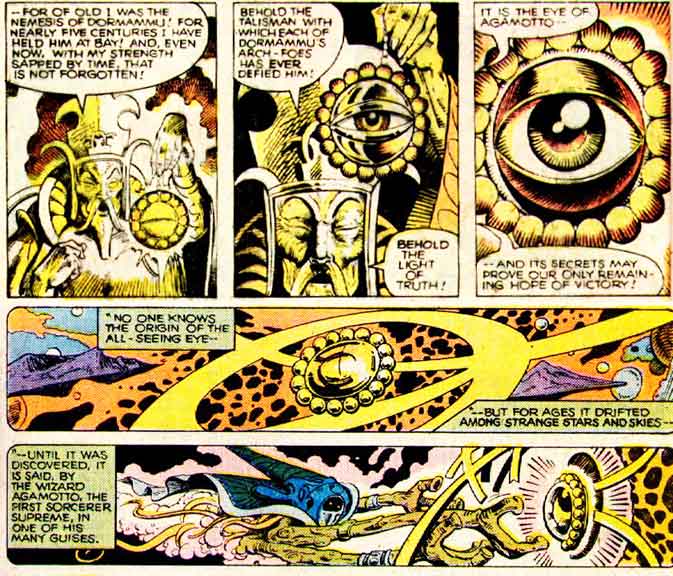
The Eye of Agamotto first appeared in Strange Tales #115, in the possession of Doctor Strange.

Image result for eye of agamotto first appearance
(The Eye of Agamotto, explained in the early comics it appeared in - credit: Marvel Comics)

The Eye's powers revolve around the supernatural and magical side of the Marvel Universe, including being able to see through illusions & disguises, look through time, and locate beings by psychic means. It can create portals and suspend objects too, but it's most recognisable purpose is just as the clasp for Strange's Cloak of Levitation.

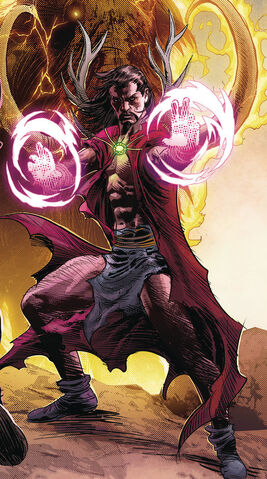
In 2017, Marvel introduced the human embodiment of Agamotto from 1,000,000 BC. He was part of the Stone Age Avengers, and was the Earth's first Sorcerer Supreme. He wears a pendant similar to the one Strange wears named after Agamotto.


File:Agamotto (Earth-616) from Marvel Legacy Vol 1 1 Deodato Wraparound Variant Textless.jpg
(Agamotto from a variant cover of Marvel: Legacy #1 - credit: Marvel Comics)

In 2016, the Eye of Agamotto was introduced into the Marvel Cinematic Universe in Doctor Strange, directed by Scott Derrickson. In this continuity, the Eye itself was just a case for one of the six Infinity Stones spread throughout the MCU; this one being the Time Stone. Using the Eye of Agamotto allows the user to control time itself; make it start & stop, slow down, speed up, and create time loops on repeat infinitely.


(Doctor Strange using the Eye of Agamotto to create an infinite time loop; every time he dies, he restarts from the beginning of the loop - credit: Marvel Studios)

The Eye later reappeared in Thor: Ragnarok (albeit without being used) and Avengers: Infinity War, in which the Eye casing was destroyed and the Time Stone was stolen from it; both actions comitted by Thanos.


The Eye of Agamotto has only had two designs throughout media; the comic design and the movie design.

In the comics, the Eye is comprised of a disc, two hollow quarter spheres, multiple small beads around the edge of the disc and the eye inside. It's completely gold, and the actual eye changes colour.

Related image
(The comic look of the Eye of Agamotto - credit: Marvel Comics)

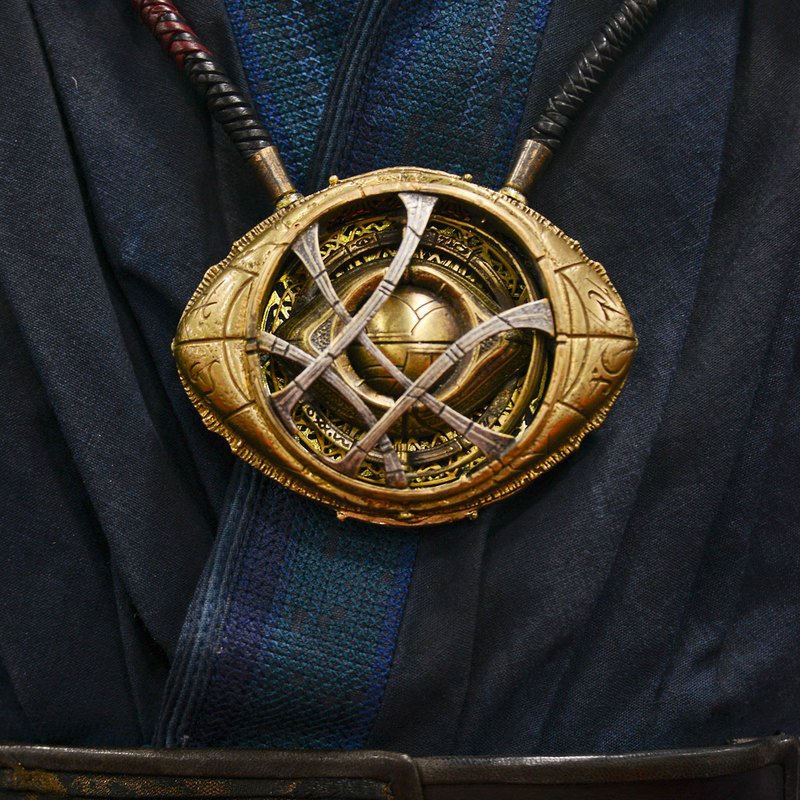
In the movies, it's squashed down from a circle to more of an oval, with spiked edges where two semi-circles meet. There's more depth to the casing, including a hollowed out circle holding the Time Stone, two quarter spheres covering the stone (similar to the comic design), and a cross hatch design overlaying the Stone resembling the Doctor Strange emblem. Instead of acting as a clasp for the Strange's Cloak, this Eye of Agamotto more resembles a necklace, with two prongs sticking out at the top. The Eye uses different shades of gold, bronze and silver for the casing, and the Time Stone inside is green.

Image result for eye of agamotto
(The Eye of Agamotto from 2016's Doctor Strange - credit: Marvel Studios)

For the animation, much like the Infinity Gauntlet (see this post), I'm going to use the MCU design. The two would fit together much better than if one design was from the comics and one from the movies. The two mediums, while trying to convey the same idea of the prop, have different visual languages that aren't too compatible next to each other.

Sunday, December 9, 2018

WEEK 2 SUMMARY

WEEK BEGINNING: 3rd of December, 2018
WEEK ENDING: 9th of December, 2018

[DISCLAIMER: I missed some of this week for personal reasons. Sessions I missed will not be covered in depth.]


MONDAY - Introduction to "Guess the Movie" task

Original blog post: https://ncarolannua1b.blogspot.com/2018/12/animation-principles-introduction.html

- This was just our introduction to our "Guess the Movie" project, that's running for 4 weeks and involves taking two props from a live action movie and making them morph into each other.

- "So this project seems REALLY exciting! I love working with media I love; it's the kind of stuff I was doing before starting this course. When both your subject matter and your medium involves something you're passionate about, then you become a lot more invested in it, which is exactly what I'm going for! From here, I think asset creation is what I'm going to aim for next. The drawing tools in After Effects, the program we're making this animation in, aren't really my cup of tea. However, I'm a lot more comfortable in another vector based program, Illustrator. I could make the assets there and import them over somehow? Will have to look into that."

TUESDAY - Narratology: "Only Trouble is Interesting?"

Original blog post: https://ncarolannua1b.blogspot.com/2018/12/narrative-only-trouble-is-interesting.html 

- We discussed if stories had to have some kind of conflict, and looked at the ideals of Western storytelling standards vs Eastern ones.

- "This session was generally very interesting! Before this, I thought I had a pretty good understanding of plot structure, but I learnt a lot more that I wouldn't have known had I not attended! The most interesting thing was definitely Kishotenketsu; it's a fairly unconventional plot structure for western societies, and one I didn't know about beforehand. I really want to keep the structure in the back of my mind, so that when the time comes to make my own story, I can consider this less seen method!"

THURSDAY - (absent) After Effects session

From what I've gathered, this session was just getting a start with the "Guess the Movie" task.

SUMMARY
Getting the brief on our After Effects project was a lot more exciting than I thought it would be! I love working on projects that involve the things we love, and being a huge fan of superhero movies, I was up for working on anything that meant I could incorporate my favourite movie in it! Although it does come with the angle of it having to be done in After Effects... my experience thus far with the program has NOT been good. But I guess it's something I'm just going to have to get used to, especially if I want to be able to do the things I want to with this task.

Narratology this session was really interesting; a lot more so than I usually expect from these types of lectures. I knew beforehand there were certain formulas and tropes that stories fall into, but I never knew there were certain ones that are almost always present dependent on your location. Kishotenketsu was really interesting to look into as well! We also got the 5 question templates for our essays; I think I'm going to look at the one regarding how animation is intrinsic to the narrative. It seems really interesting, and right up my alley! It also means my ideal film of Who Framed Roger Rabbit? fits a lot more.

Sunday, December 2, 2018

WEEK 1 SUMMARY

WEEK BEGINNING: 26th of November, 2018
WEEK ENDING: 2nd of December, 2018

MONDAY: Introduction to Unit BA1b, Introduction to After Effects

Original blog posts:

Intro to BA1b - https://ncarolannua1b.blogspot.com/2018/11/unit-ba1b-introduction.html

- A general introduction to what we'd be doing over the next few months, involving a practice task involving morphing.

- "Overall, I was happy with this session! But what I'm most looking forward to is the rest of the unit. Especially learning how to do 3D animation in Maya; I've never done CGI animation before, so it'll be interesting learning if it'll be easy, difficult, or maybe even something I'd want to keep doing throughout all 3 years! The Mystery Box project seems interesting as well; I'd seen previous examples of it, and it looks like a lot of fun to come up with the ideas and execute them!"

After Effects - https://ncarolannua1b.blogspot.com/2018/11/animation-principles-after-effects.html

- An introduction to our Motion Graphics and After Effects Morphing projects. Taught us the basics of After Effects.

- "Overall thoughts? Honestly, I didn't really like this session. Motion graphics usually don't interest me, but I thought I'd give it a fair shot with this introductory session like I had done for things I previously didn't like in the last unit. But ultimately... I don't think it's for me. The combination of the subject matter itself and After Effects wasn't my cup of tea, and I can't see myself utilising motion graphics outside my university work."

TUESDAY: Introduction to Narratology

Original blog post: https://ncarolannua1b.blogspot.com/2018/11/narrative-introduction.html

- An introduction to our new essay project, looking at Narratology.

- "[...]But I did enjoy this lecture! Granted, the subject matter for this essay isn't as personally interesting as the last one was (the subject was characters). But I just need to make sure I choose something I'll be happy writing about and then it should all be alright from there! I'm struggling to come up with a comprehensive pool of films I could choose from for this, the one I'm gravitating towards most is Who Framed Roger Rabbit?. I'm going to have to double check if I'd be able to use that film though, since it's only partially animated. But overall, enthusiastic about this project!"

THURSDAY: After Effects Development

Original blog post: https://ncarolannua1b.blogspot.com/2018/11/animation-principles-after-effects_29.html

- Further development on After Effects skills

- "Overall, this session was a lot like the last After Effects one; I didn't really enjoy it too much, nothing really appealed to me personally. After Effects still doesn't feel like "my thing", especially after giving it a fair go both at uni and when finishing work at home. While the animation came out alright, it just about meets my own personal standard. The thing I feel holding me back from making it better is just my incompatibility with After Effects. I should try and find ways to make things easier to work with next week."

SUMMARY
Overall, this was a solid week in terms of introductions to the new projects. 

The entirety of BA1b looks interesting, in terms of the range of things we do and the time we get to do it. It seems as if it'll be more fast paced than BA1a was, where it was 1 project for about 2 months; now it's a few weeks per project. CGI and the Mystery Box are what interest me the most; aspiring to do CGI at an early age was what got me into animation, but I've not done it before up to this point. And seeing previous year's Mystery Box animations look really cool, creating a character of your own and bringing them to life! That's right up my alley!

After Effects on the other hand... is not. I've said it in my previous blog posts about the program, but I don't really get along with it. I gave it a fair chance to sway me, but I think it's gone under the listing of "programs I don't like". I'll use it if necessary, like for this project and such, but I can't see myself using it outside of university usage any time soon.

Finally, the Narratology project. Like I said, the topic we're looking at doesn't appeal to me as much as the Character project did, I can still spin it to become a lot more engaging to me personally! One of my main goals with this research project is to use a film I don't know inside and out; that means no LEGO Movie (even though I did that one last unit) and none of the Toy Story trilogy. This still leaves me with a lot of films I really enjoy that I could write about; as stated before, Who Framed Roger Rabbit? has been on my mind a lot; that could be a good choice.

Thursday, November 29, 2018

ANIMATION PRINCIPLES - AFTER EFFECTS DEVELOPMENT

This session, we developed on our After Effects skills, and did an exercise more heavily focused on morphing.

Our brief was given at the start of the session; take a square and a circle. Make one morph into the other, and back again. We were advised to consider both the 12 Animation Principles & where they can be applied, and to come up with unique ideas for each transformation.

I came up with my two ideas; I had the square squash in it's sides to their extremes, making the shape more resemble an "X". Once it reached a breaking point, it would snap into four individual spiked components. They'd then reform into the circle. Once the circle was reformed, I'd have a simple squash down and reemerge as the square again.

I managed to get the square to morph into the X shape easily enough; just change some attributes using bezier handles. But it was splitting the shape up that was the problem. I thought that you could just select the bit you wanted to separate, press a hotkey and then it's done. But unfortunately, that wouldn't work. There was a workaround however; separate layers.

I created the four fragments on separate layers, and made an appropriate switch out when needed. Once the X seemed like it had reached breaking point, I brought the fragments in from offscreen and animated them as they needed to move. I used the same swapping technique when bringing in the circle; once it was onscreen, the fragments shrank into the circle, blending in with the colours, and then moving offscreen.


(The animation's first pass after finishing the session. I went back later to finish it.)

Moving back into the square was somewhat trickier. The technique I had used in the last session to turn on shape into another wasn't working; this was pretty frustrating, considering that action was the base for everything else I was going to apply to the squash and stretch back up. But I realised I could just use the same thing I did for the segments yet again. I learned later on that the elements of the animation didn't actually have to morph, but look like they did.

I eventually finished, with this as the final pass;

(The final pass of the animation.)

Overall, this session was a lot like the last After Effects one; I didn't really enjoy it too much, nothing really appealed to me personally. After Effects still doesn't feel like "my thing", especially after giving it a fair go both at uni and when finishing work at home. While the animation came out alright, it just about meets my own personal standard. The thing I feel holding me back from making it better is just my incompatibility with After Effects. I should try and find ways to make things easier to work with next week.

Monday, November 26, 2018

ANIMATION PRINCIPLES - AFTER EFFECTS INTRODUCTION

This session, we were introduced to the program After Effects and started learning how to use it.

After Effects is a program released by Adobe, and is used in video editing and creation. It comes with a preset selection of visual effects and tools that can be applied to clips and assets.

Image result for after effects ui
(After Effects' user interface - credit: Adobe)

This session was essentially just messing about with the program, learning a few key skills and then combining some of them.

We also had a brief look into the world / industry of motion graphics, which typically use After Effects.
"Motion graphics are pieces of digital footage or animation which create the illusion of motion or rotation, and are usually combined with audio for use in multimedia projects." - Wikipedia's definition of Motion Graphics
Motion graphics can be applied in many areas, such as in advertising, video essays, and within film & television.

The website Motionographer is a hub for many different motion graphics projects from many different artists. They'll have interviews with the creator(s), explain what the video was for, and give all the necessary details about the video itself to anyone who desires it.

We also looked at Art of the Title, a somewhat similar website, but dedicated to the opening / closing titles of films and TV shows. The site does breakdowns with people involved on the projects, be it directors, producers, etc. Influences and analysis are included within the page for each film, citing anywhere that the team making the titles may have been influenced.

(Jessica Jones gets a page dedicated to it's opening titles, featuring interviews with the creative director, illustrator and lead designer - credit: Art of the Title)

Once we had a brief look at the websites, we went on to learn some basic After Effects tools. We added shape layers, text, strokes, and techniques I was aware of beforehand, but not experienced with in After Effects.

At this point I was starting think that this wouldn't be like the other Adobe programs I'd used before. Everything was there, just like the other programs. But they worked differently, it felt weird expecting a tool to do one thing, then have it do something completely different.

We next looked at something I was more comfortable in; making what we'd put onscreen actually move. AE uses the same system to have elements moving onscreen as Adobe Premiere Pro, a program I feel more versed in. For each element, it has it's own timeline. By placing markers on that timeline and moving the element, it creates it's own movements in between the two markers. This can also be used to alter an element's scale and rotation, which we also messed around with.

We also looked at motion paths. A motion path can be used to lead an element along a certain route, and combining it with each element's timeline can lead to speed changes along the motion path, kind of like how rollercoaster carts slow down and speed up as it travels along the track.

Finally was morphing two shapes from one into the other. I followed this tutorial, which helped out learning the basics of morphing in AE.


(A tutorial on morphing shapes in After Effects - credit: Mobox)


It essentially involves creating the two shapes seperate of each other, creating two keyframes for each shape (1 start, 1 end), making their paths bezier paths, and moving one shape's end keyframe into the timeline of the other. All those steps combined leads to one basic morphing shape!

I combined elements from everything we did to create a rather silly looking, but ultimately functional animation. I had the two shapes morphing into each other, spinning around as it did, and the text followed a twisting and turning motion path.

Overall thoughts? Honestly, I didn't really like this session. Motion graphics usually don't interest me, but I thought I'd give it a fair shot with this introductory session like I had done for things I previously didn't like in the last unit. But ultimately... I don't think it's for me. The combination of the subject matter itself and After Effects wasn't my cup of tea, and I can't see myself utilising motion graphics outside my university work.